

TL;DR: Fake cheats and scam Discord links steal logins. Out-of-date BIOS and Windows defenses left off leave the door open. Dust and dried thermal paste quietly kill performance. A 45pt Tune-Up covers malware cleanup, Windows updates, BIOS checks, and temps. For yearly hardware maintenance plus quarterly software tune-ups, see the No Worries plan.
If your gaming PC feels slower, hotter, or less trustworthy than it used to, it may not be “just getting old.” A lot of the latest problems for PC gamers come from malware dressed up as free stuff, accounts getting phished, firmware that never got updated, and heat that nobody cleaned out. I’ve been fixing computers in the Rockford area since 2016, and these are the patterns that keep showing up on gaming rigs.
Fake Cheats, Mods, and Free Skins Steal Logins
Info-stealers like Lumma and RedLine still show up inside fake cheats, mods, cracks, and “free skins” downloads. Once they run, they grab saved passwords, Discord tokens, and Steam sessions. That is how a free download turns into emptied inventories and friends getting spam from your account.
- Only install mods and tools from official stores or well-known repos you already trust
- Treat “disable antivirus to install this” as a hard stop
- If an account got hit after a sketchy download, change the email password from a clean device first, then secure the gaming accounts
Discord and Steam Phishing Still Works
Account takeovers often start with a message, not a technical hack. Fake “free Nitro,” “vote for my team,” “I reported you by accident,” or trade links send you to lookalike login pages for Discord or Steam. One bad sign-in and the account is gone, then used to scam your friends.
- Never log in through a link someone sent you. Open the app or type the site yourself
- Turn on two-step sign-in for Discord, Steam, Epic, and the email that recovers those accounts
- If the same account gets taken again after a password change, the PC itself may still be handing over new passwords
Out-of-Date BIOS and Firmware Leave Real Holes
A Windows reinstall does not update your motherboard firmware. BIOS updates matter for security and for stability. Intel’s 13th and 14th gen desktop instability issues were addressed with BIOS microcode updates in 2024. Firmware flaws like LogoFAIL and AMD Sinkclose sit below the operating system, so wiping the drive will not patch them. A proper BIOS update from the board maker will.
Kernel anti-cheat drivers have been abused too. In 2022, ransomware actors used Genshin Impact’s signed mhyprot2 driver to kill antivirus from kernel mode. That is why “turn security off so the game runs” is a habit that can stick around long after the match ends.
- Check your motherboard maker’s support page for the latest stable BIOS
- Do not flash random BIOS files from forums
- After a flash, confirm Secure Boot and TPM settings still match what you need
Windows Defenses Left Off, Including Old Windows 10 Rigs
Defender, Secure Boot, and TPM often get turned off for a tweak, a cheat, or “more FPS,” then never get turned back on. That leaves the PC open long after the setting change is forgotten.
Windows 10 support ended on October 14, 2025. Without Extended Security Updates enrollment, those machines stop getting Microsoft’s regular security fixes and become easier targets. If you are still on Windows 10, the real choices are ESU enrollment, a Windows 11 upgrade when the hardware qualifies, or a cleaner path forward.
- Confirm Defender, Secure Boot, and TPM are on unless you have a specific reason they cannot be
- Keep Windows Update current on supported versions
- On Windows 10, check whether ESU is enrolled before you assume the PC is still getting patches
Heat, Dust, and Dried Thermal Paste Quietly Kill Performance
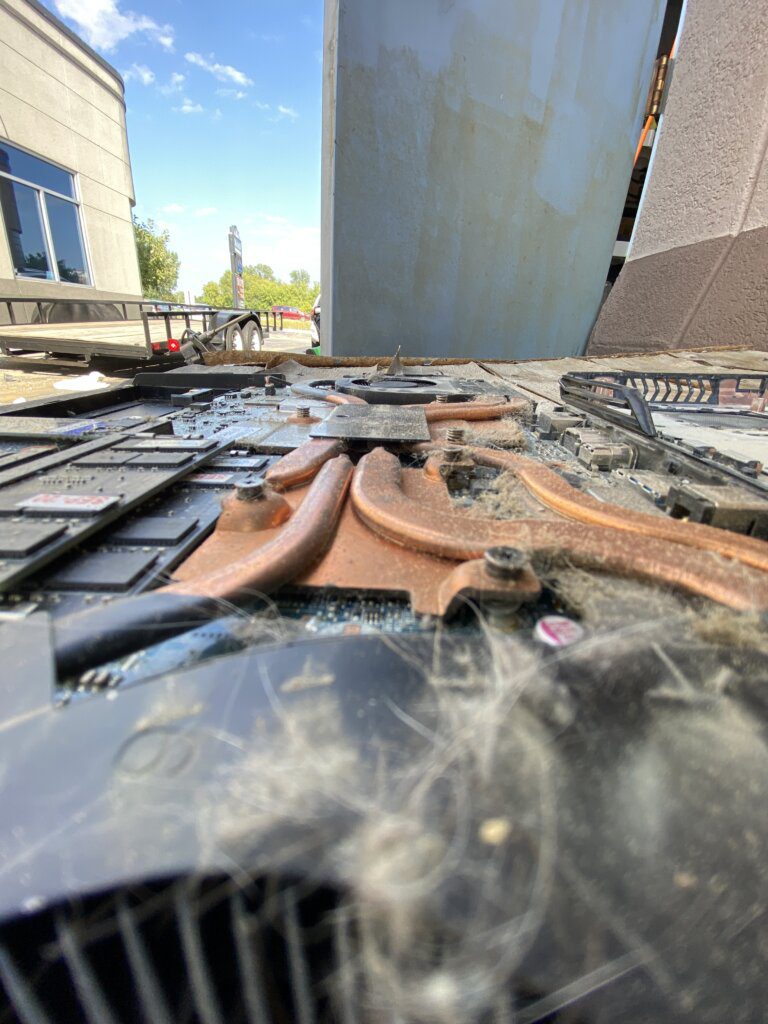
Dust-packed heatsinks and dried-out thermal paste cause throttling, random crashes, and nights where FPS tanks for no clear reason. I redo the paste on my own machines every year. For most gaming PCs, every 2 to 3 years is a solid schedule, sooner if the case runs hot or the fans sound like a hair dryer.
- Blow out dust from heatsinks and filters on a regular schedule
- Watch for sudden thermal throttling or louder fans under the same loads
- Plan a paste redo every 2 to 3 years on a hard-used gaming rig
When the Rig Needs a Real Check
A 45pt Tune-Up covers malware cleanup, Windows updates, BIOS checks, and temps. If you want that on a schedule, the No Worries plan pairs yearly hardware maintenance with quarterly software tune-ups.
Driver Bloat and Loose Power Connectors
RGB suites, launchers, and overlays stack up until boot takes forever and games stutter. Cleaning startup items and leftover driver junk often brings the snappy feel back without buying new parts.
High-end cards have their own gotcha. The 12VHPWR connector on RTX 4090 cards, and similar high-power plugs on newer cards like the RTX 5090, can overheat and melt when the plug is not fully seated or the cable is bent hard right at the connector. Seat it until it clicks, keep a gentle bend radius, and do not yank on it.
- Trim startup apps you do not need every boot
- Uninstall RGB and launcher suites you no longer use
- Check that the GPU power connector is fully latched with no sharp bend at the plug
Get the Gaming PC Checked
If any of this sounds familiar, a 45pt Tune-Up is the clean next step. I will check for malware, get Windows updates current, review BIOS and temps, and clear the software clutter that slows boot and adds stutter. Ongoing cover lives under Tolerate Tech, including the No Worries plan for yearly hardware maintenance and quarterly software tune-ups.